Add & Edit PDF Bookmarks Easily
Build a full table of contents for any PDF — add, rename, reorder, and nest bookmarks without any specialist software.
Free & full-featured · No uploads · Works offline
NAVIGATION

Make long PDFs easy to navigate
A clear bookmark tree helps readers jump straight to the section they need.
Drag to reorder: Rearrange bookmark entries with a simple drag-and-drop — no typing required.
Nested hierarchy: Create parent and child entries to mirror your document's chapter structure.
Rename in-place: Double-click any bookmark to rename it without leaving the panel.
Frequently Asked Questions
Everything you need to know before you get started.
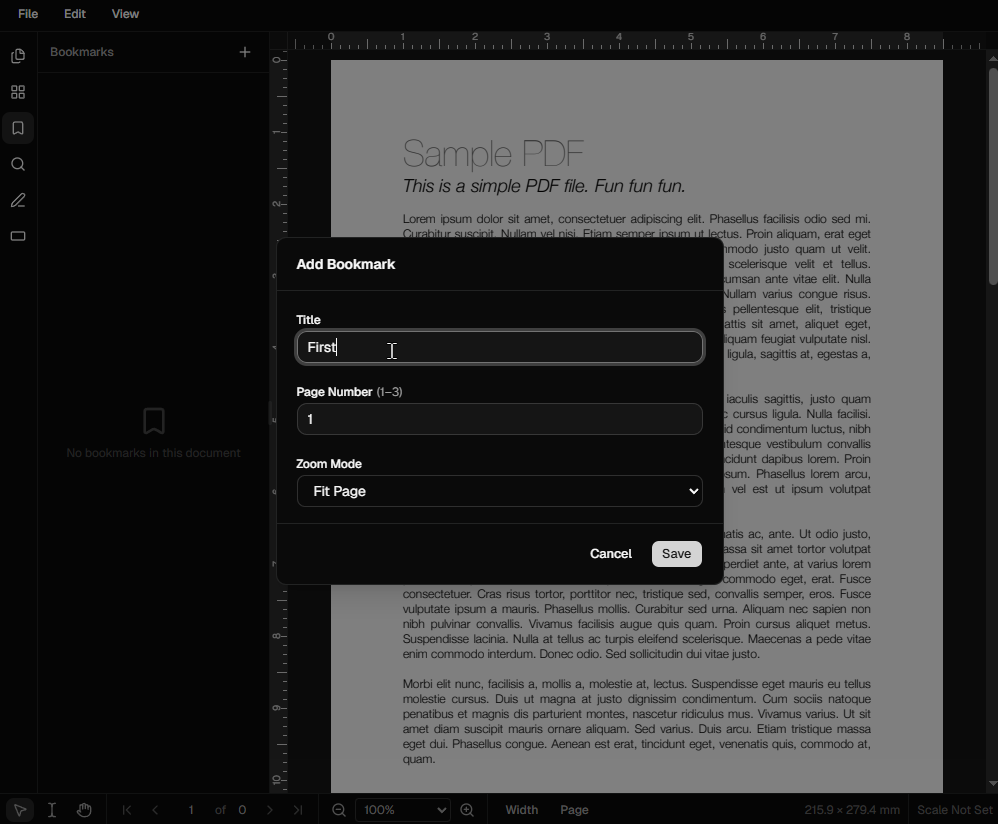
How do I add a bookmark to a PDF?
Step-by-step guide
Open the Bookmarks panel from the left sidebar. Navigate to the page you want to bookmark, click the '+' button, and give the bookmark a name. It will link directly to the current page view.
Can I create nested (child) bookmarks?
Hierarchy support
Yes. Drag a bookmark entry onto another to make it a child. You can nest bookmarks as deeply as you like to reflect chapters, sections, and sub-sections.
Can I edit existing bookmarks?
Editing & renaming
Absolutely. Double-click any bookmark in the panel to rename it. You can also drag it to a new position in the tree, or delete it entirely.
Are bookmarks saved when I export?
Export compatibility
Yes. Bookmarks are saved into the PDF's outline structure when you download, so they appear in any standard PDF viewer such as Adobe Acrobat, Preview, or Chrome.
Ready to get started?
Open DraftPDF in your browser — no account, no install, no data ever leaves your device.
Free & full-featured · Works offline · No sign-up required
Related Tools
Merge PDFs
Open multiple PDF files and combine them into one document in seconds. Free, browser-based PDF merger — no uploads, no installs.
➕Insert Pages
Add pages from another PDF or insert blank pages anywhere in your document. Free, browser-based, no uploads required.
✂️Delete Pages
Remove unwanted pages from any PDF document instantly. Browser-based, no uploads, no installs.
✏️Edit PDF
Edit, annotate, and modify PDF files directly in your browser. No software install, no uploads.