Make Annotations Permanent
Bake highlights, comments, stamps, and drawings directly into your PDF pages so they become part of the document — visible in every viewer, impossible to edit or remove.
Free & full-featured · No uploads · Works offline
FLATTEN & FINALIZE
Lock annotations into the page permanently

When you flatten an annotation, DraftPDF uses PDFium to render the annotation directly into the page content stream — exactly the same result as printing and scanning, but without any quality loss.
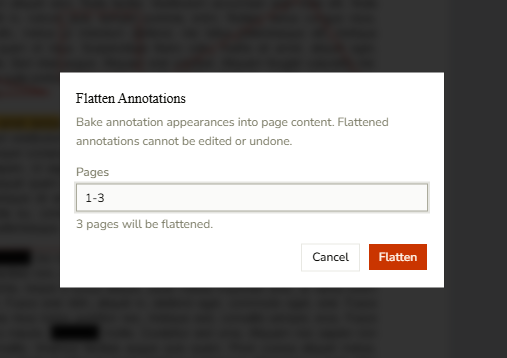
Flatten by page range: Use Edit > Flatten Annotations to choose which pages to flatten, from a single page to the entire document.
Flatten a single annotation: Right-click any annotation in Select mode and choose Flatten to bake just that annotation into the page.
Flatten selected annotations: Select multiple annotations in the Markup List and click Flatten Selected to bake them all in one step.
PRIVACY & COMPATIBILITY
Share documents that look right everywhere
Flattened PDFs render consistently in every PDF viewer — no missing fonts, no editable comment bubbles, no annotation layers that might display differently on another device.
Redaction-safe workflow: Flatten annotations before sharing to ensure no annotation metadata remains in the file that could leak information.
Universal compatibility: Flattened content is plain page geometry — it displays identically in Adobe Reader, Chrome, Preview, and every other viewer.
100% local processing: Flattening runs entirely inside your browser using WebAssembly. Your document never leaves your device.
Frequently Asked Questions
Everything you need to know before you get started.
What does flattening an annotation do?
How it works
Flattening bakes an annotation's visual appearance into the underlying page content stream. After flattening, the annotation no longer exists as a separate object — its ink, color, and shape become part of the page itself, just like the original text and images.
Can I undo a flatten?
Reversibility
Flattening is permanent and cannot be undone. Save a copy of the document before flattening if you need to access the markups later.
Is flattening safe for redaction?
Privacy
Flattening removes the annotation object so its metadata is no longer stored in the PDF. However, for legally sensitive redaction workflows, use the dedicated Redact tool — it is purpose-built to remove both the annotation and the underlying content it covers.
Can I flatten just some pages, not the whole document?
Partial flatten
Yes. In the Edit > Flatten Annotations dialog you can enter any page range, such as "1-3" or "5, 7, 10". Only the specified pages are affected.
Does flattening affect PDF quality?
Output fidelity
No. DraftPDF uses PDFium to flatten annotations at their native resolution. Vector shapes stay vector; images retain their original DPI. There is no rasterization or quality loss.
Ready to get started?
Open DraftPDF in your browser — no account, no install, no data ever leaves your device.
Free & full-featured · Works offline · No sign-up required
Related Tools
Merge PDFs
Open multiple PDF files and combine them into one document in seconds. Free, browser-based PDF merger — no uploads, no installs.
➕Insert Pages
Add pages from another PDF or insert blank pages anywhere in your document. Free, browser-based, no uploads required.
✂️Delete Pages
Remove unwanted pages from any PDF document instantly. Browser-based, no uploads, no installs.
🔖PDF Bookmarks
Create, edit, and organise PDF bookmarks (outlines) to make navigation effortless. Free, browser-based.