DraftPDF
Annotate, measure, stamp, sign, and edit PDF documents with a full suite of engineering-grade tools that run entirely on your device.
Free & full-featured · Works offline · No data leaves your browser
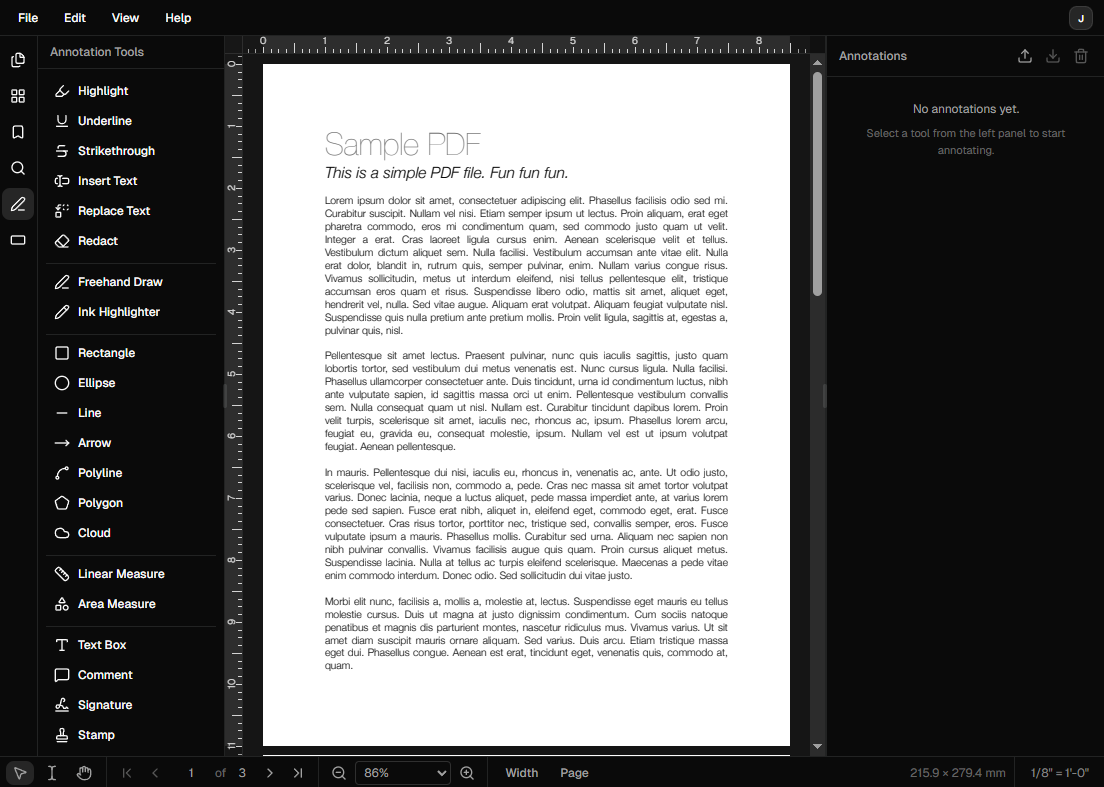
Made for drawings and calculations
Edit the lines on a drawing the way you would in CAD, measure it at a real scale, and do your calculations on the page that they belong to.
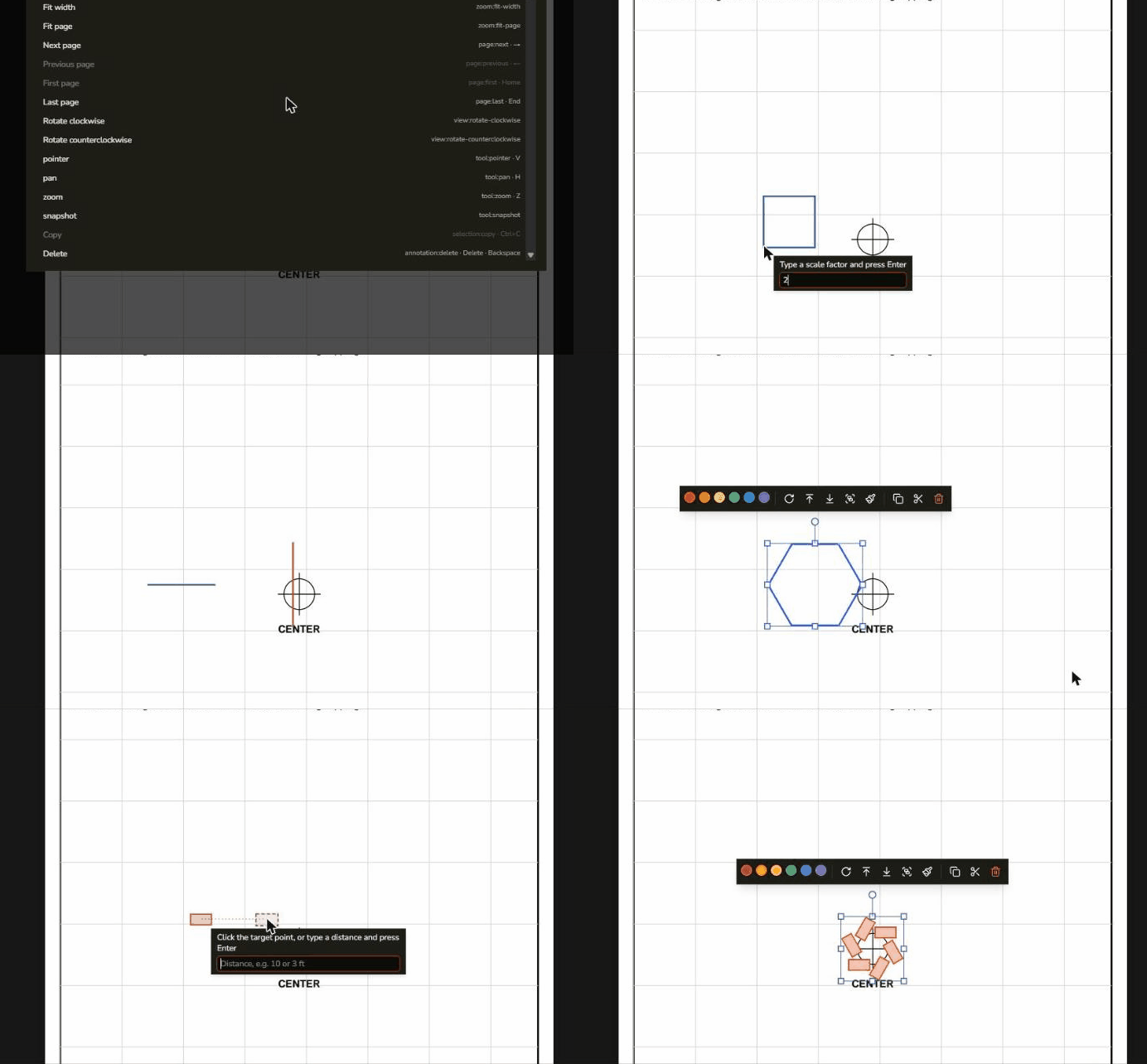
Offset, Trim, Mirror and Array Your PDF Markups
The edit commands you know from CAD, on the lines, shapes and measurements you draw on a PDF. Type a distance in real units, see the result before you click, and undo any command in one step.
- Base point and typed distance: Click where it goes, or type a distance such as 3 ft and press Enter. Distances follow the page scale, so you work in real units.
- Mirror and scale: Flip markups across a line you pick, or scale them about a point by a factor such as 2 or 50%. Rectangles and ellipses keep their proportions.
- A hotkey for every command: M to move, I to mirror, S to scale, and so on. The hotkeys show in the menu, and every command is in the command palette.
Do Your Calculations Right on the Drawing
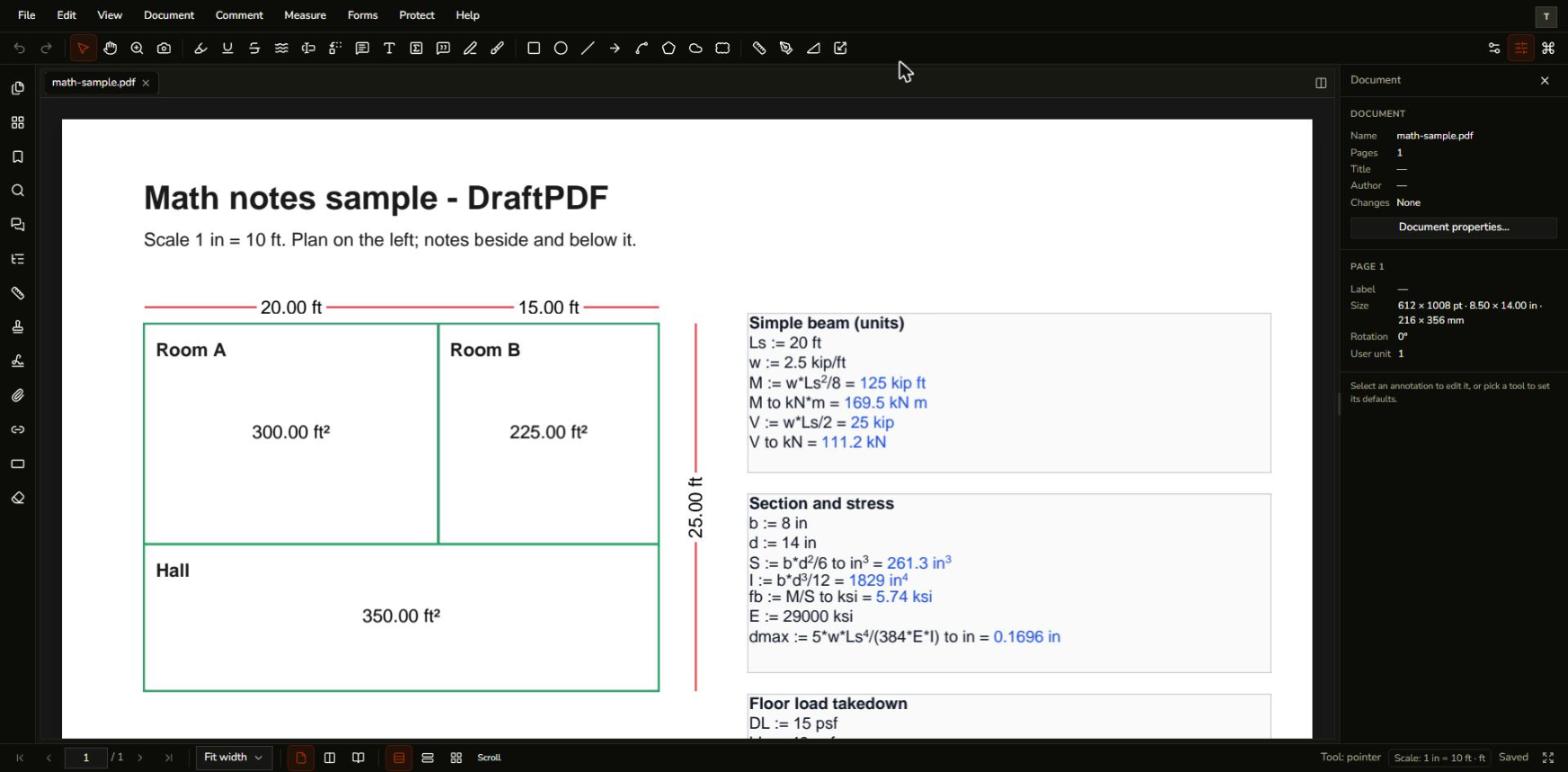
Type a line like M := w*L^2/8 = in a text box and DraftPDF writes the answer after the equals sign, with units, so anyone who opens the PDF can read it.
- Define and reuse values: Write L := 20 ft or w := 2.5 kip/ft once, then use the names in later lines and in other math text boxes on the same page.
- Units that convert: Work in ft, in, m, mm, kip, kN, psf, ksi and more, and add "to kN*m" to a line to choose how its result is shown.
- Results that stay in the file: The answers become part of the page, so colleagues using any other PDF reader see them. Only text boxes you mark as math are ever calculated.
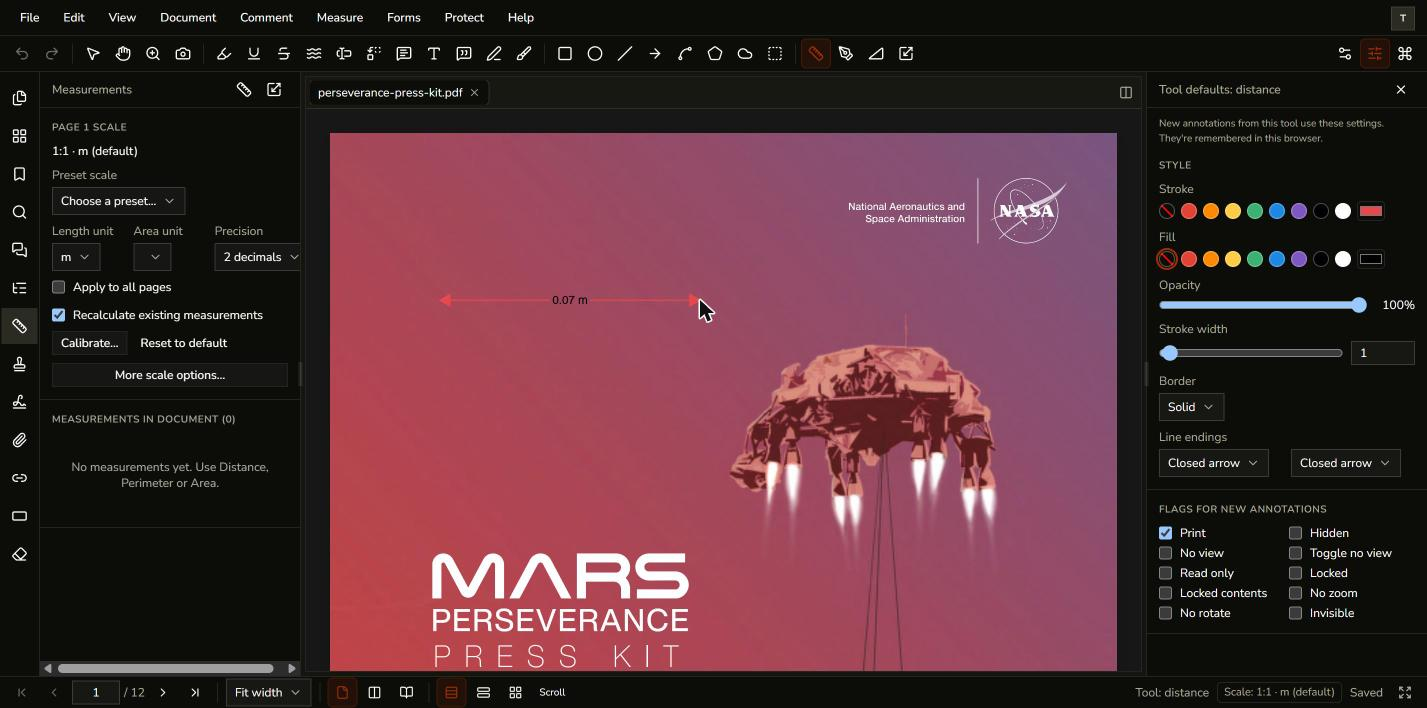
Measure PDF Drawings With Real Scale
Calibrate a page, apply engineering or architectural scales, and place accurate dimensions directly on your PDF drawings.
- Page scale setup: Set a scale per page or apply the same scale across the whole document from a dedicated scale dialog.
- Preset and custom ratios: Use common architectural and engineering presets or enter custom ratios such as inches-to-feet or metric scales.
- Measured annotations: Create dimensioned line and area markups that display real-world values instead of raw PDF points.
- Rulers: Turn on rulers from the View menu to read inches along the top and left of the page while you work.
- Calculate from measurements: Use measured lengths and areas by name in a math text box, for example sum(areas()) for the total area on the page.
Pricing
Choose the plan that fits your workflow, then upgrade or manage your subscription whenever you need.
Ordering for a large team? Contact us for volume pricing on 10 or more licenses.
Explore Our Features
Choose the feature you need to get started with your PDF workflows.
Combine PDF Files Effortlessly
Open multiple PDFs and merge them into a single document in seconds — all inside your...
➕ Insert PagesInsert Pages into Any PDF
Add a blank page, import pages from another file, or insert at any position — all wit...
✂️ Delete PagesRemove Pages from PDF in Seconds
Select one page or many and delete them instantly. No re-uploading, no waiting — just...
🔖 PDF BookmarksAdd & Edit PDF Bookmarks Easily
Build a full table of contents for any PDF — add, rename, reorder, and nest bookmarks...
✏️ Edit PDFEdit PDFs Directly in Your Browser
Add text, shapes, stamps, signatures, and more to any PDF — a full editing toolkit th...
🖍️ Markup PDFMark Up PDFs With Ease
Highlight passages, draw shapes, add comments, and redline documents without installi...
💬 Annotate PDFAnnotate Any PDF In Your Browser
Highlights, notes, callouts, shapes, revision clouds, measurements, stamps, links and...
📏 PDF MeasurementsMeasure PDF Drawings With Real Scale
Calibrate a page, apply engineering or architectural scales, and place accurate dimen...
🧮 Math NotesDo Your Calculations Right on the Drawing
Type a line like M := w*L^2/8 = in a text box and DraftPDF writes the answer after th...
🔢 Header & FooterPage Numbers, Dates and Bates Numbers on Every Page
Put a title, date or page number at the top and bottom of any pages, with Bates numbe...
📐 CAD-Style EditingOffset, Trim, Mirror and Array Your PDF Markups
The edit commands you know from CAD, on the lines, shapes and measurements you draw o...
↔️ Align & DistributeLine Up and Space Out Your PDF Markups
Pick an alignment from the toolbar and scattered markups snap into line, or space the...
🖼️ Paste ImagesPaste a Picture into a PDF, then Filter It
Copy a screenshot or an image anywhere and press Ctrl+V. Then change it with filters,...
🧾 PDF FormsCreate Fillable PDF Forms in Your Browser
Design interactive PDF forms, place widgets precisely, and switch into fill mode to t...
🔄 Rotate PagesRotate PDF Pages in Seconds
Fix upside-down or sideways pages instantly. Rotate one page, a selection, or your en...
✍️ Sign PDFSign PDF Documents Directly in Your Browser
Draw, type, or upload your signature and place it anywhere on a PDF — in seconds, ent...
⬛ Redact PDFPermanently Redact Sensitive Information
Draw redaction boxes over confidential text, PII, or images, then apply them to perma...
👁️ PDF ViewerView Any PDF Directly in Your Browser
Open PDFs instantly without Adobe Reader or any plugin. DraftPDF renders your documen...
🖨️ Flatten AnnotationsMake Annotations Permanent
Bake highlights, comments, stamps, and drawings directly into your PDF pages so they ...
💻 Installed AppInstall DraftPDF as an App
Launch DraftPDF from your desktop, taskbar, dock, or app launcher, then open local PD...
From the Blog
Guides, tips, and honest comparisons for PDF workflows.
How to Annotate PDFs for Free (No Upload Required)
Annotating PDFs doesn't require an expensive subscription or installing software. Here's how to highlight, comment, underline, and stamp PDFs for free — with all processing happening locally in your browser.
7 min read
GuidesHow to Merge PDFs Without Uploading to the Cloud
Most online PDF mergers require you to upload your files to a remote server before combining them. Here's how to merge PDFs entirely in your browser — with no upload, no waiting, and no risk to your documents.
6 min read
ComparisonsBest Free PDF Editors in 2026
Adobe Acrobat costs hundreds of dollars a year. Fortunately, several genuinely capable free PDF editors exist — some browser-based, some desktop apps, some mobile. Here's an honest look at the best options and what each one is actually suited for.
9 min read