Add Headers and Footers to PDF
Place repeating text, page numbers, total pages, bates numbers, and dates in any of six header/footer positions, then write the result directly into the PDF page content.
Free & full-featured · No uploads · Works offline

REPEATING PAGE CONTENT
Fill all six header and footer positions from one dialog
DraftPDF gives you header left, center, right and footer left, center, right fields in a single workflow, with one shared style and margin setup across the document.
Mixed text and tokens: Combine plain text with {page}, {total}, {bates}, and {date} in the same field, such as "Page {page} of {total}".
Shared formatting controls: Set the font family, font size, bold, italic, underline, text color, and page margins once for the whole header/footer definition.
Live page preview: Preview one page at a time before applying, with a visible margin rectangle that shows the header/footer content area.
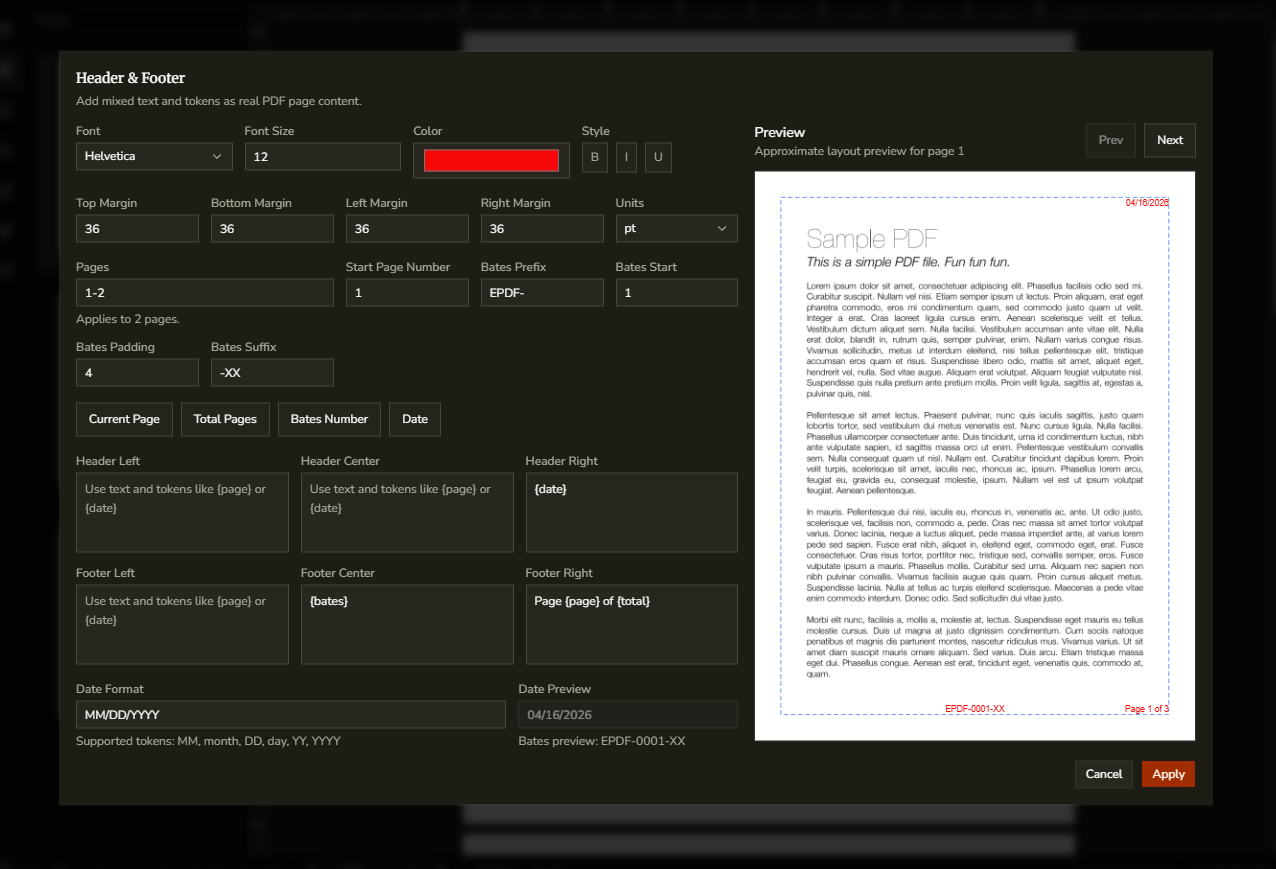
NUMBERING & PAGE RANGE
Apply page numbers, bates numbers, dates, and custom ranges
The Header & Footer dialog supports current-page numbering, total pages, configurable bates numbering, date formatting, and optional page-range targeting.
Current page and total pages: Use {page} and {total} tokens, plus Start Page Number, to control how page numbering appears.
Configurable bates sequence: Set a bates prefix, start value, padding, and suffix, then insert the {bates} token where you want the sequence to appear.
Apply to selected pages: Leave Pages blank to affect the whole document, or enter a range such as "1, 3-5" to apply the header/footer only to those pages.
Frequently Asked Questions
Everything you need to know before you get started.
What can I place in a PDF header or footer?
Supported content
DraftPDF supports plain text plus four built-in tokens: {page}, {total}, {bates}, and {date}. You can mix them in any order within the same header or footer field.
Does the header/footer stay in the exported PDF?
Output behavior
Yes. Header and footer content is written into the PDF page content itself, so it appears in downloaded/exported PDFs and in other PDF viewers.
Can I control the date format?
Date formatting
Yes. The Date Format field supports MM, month, DD, day, YY, and YYYY tokens. For example, you can use "MM/DD/YYYY" or "month DD, YYYY".
Can I apply headers and footers to only some pages?
Page range support
Yes. The Pages field accepts ranges such as "1, 3-5". If it is blank, the header/footer is applied to every page in the document.
Can I edit or remove a header/footer later?
Updating existing content
Yes. Reopen Edit > Header & Footer… for the same document to reload the saved settings. You can update the fields and reapply them, or use Remove Header & Footer to delete the DraftPDF-managed content.
Ready to get started?
Open DraftPDF in your browser — no account, no install, no data ever leaves your device.
Free & full-featured · Works offline · No sign-up required
Related Tools
Merge PDFs
Open multiple PDF files and combine them into one document in seconds. Free, browser-based PDF merger — no uploads, no installs.
➕Insert Pages
Add pages from another PDF or insert blank pages anywhere in your document. Free, browser-based, no uploads required.
✂️Delete Pages
Remove unwanted pages from any PDF document instantly. Browser-based, no uploads, no installs.
🔖PDF Bookmarks
Create, edit, and organise PDF bookmarks (outlines) to make navigation effortless. Free, browser-based.