Do Your Calculations Right on the Drawing
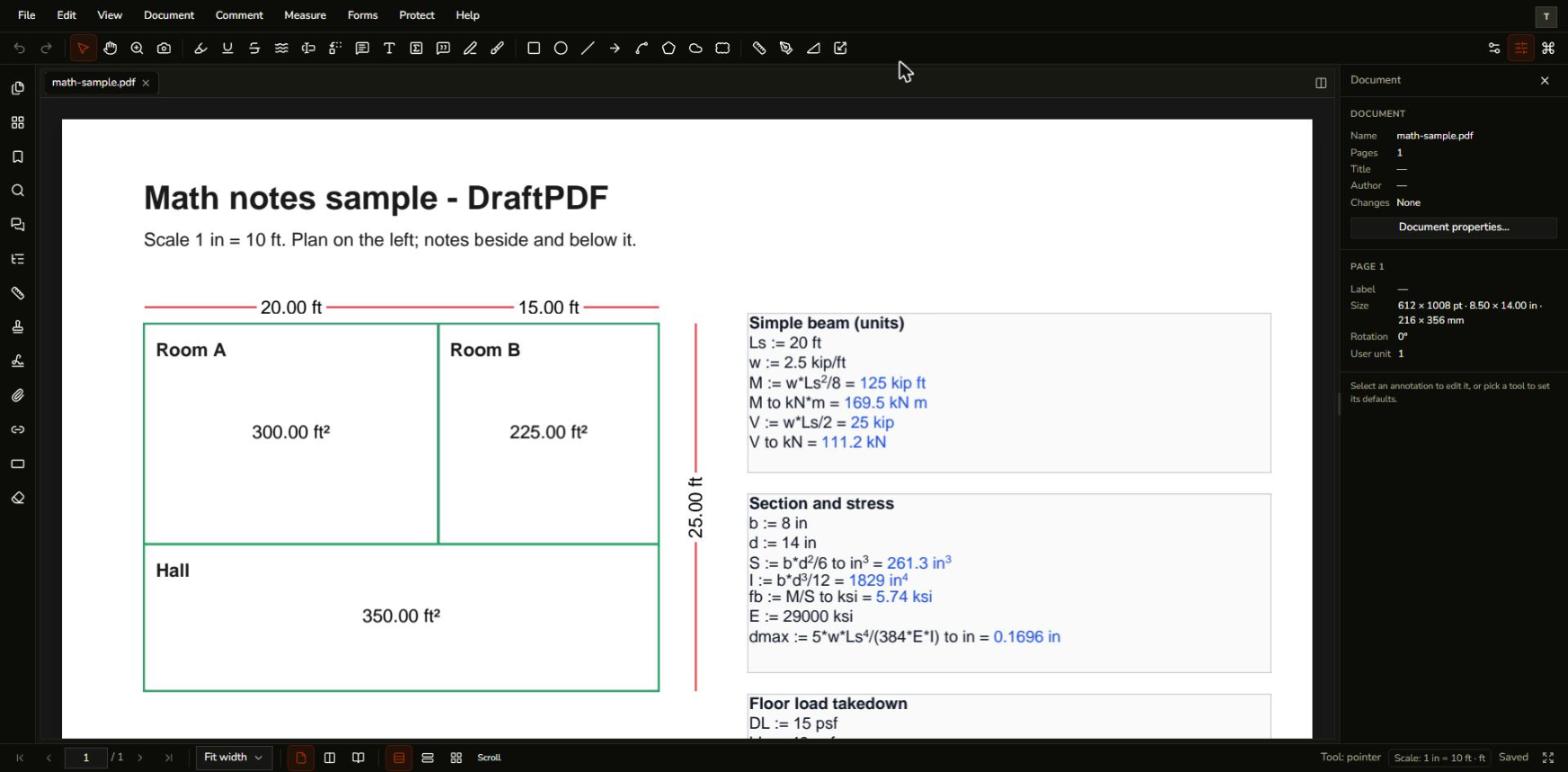
Type a line like M := w*L^2/8 = in a text box and DraftPDF writes the answer after the equals sign, with units, so anyone who opens the PDF can read it.
Free & full-featured · No uploads · Works offline
CALCULATIONS WITH UNITS
Show your work where the work is
Keep hand calculations next to the plan they belong to instead of in a separate spreadsheet.
Define and reuse values: Write L := 20 ft or w := 2.5 kip/ft once, then use the names in later lines and in other math text boxes on the same page.
Units that convert: Work in ft, in, m, mm, kip, kN, psf, ksi and more, and add "to kN*m" to a line to choose how its result is shown.
Results that stay in the file: The answers become part of the page, so colleagues using any other PDF reader see them. Only text boxes you mark as math are ever calculated.
LINKED TO MEASUREMENTS
Calculate from what you measured
Distance, perimeter and area markups on the page can be used by name in a calculation.
Named measurements: New measurements are named L1, P1, A1 and so on. Use them directly, or look one up with area("Room A") or len("Beam 1").
Totals in one line: Use sum, mean, min, max and count with a wildcard such as "Room *", or sum(areas()) for everything on the page.
Follows your edits: Stretch a measurement and the note that reads it updates a moment later.
Frequently Asked Questions
Everything you need to know before you get started.
How do I do a calculation in a PDF?
Step-by-step guide
Choose the Math text box tool (the box with a Σ) from the Annotate toolbar, drag a box on the page and type a line such as M := w*Ls^2/8 =. Click outside the box and the result appears in blue after the equals sign.
Which units can I use?
Units and conversion
Length, area, volume, force, pressure and stress units in US customary and SI, including ft, in, m, mm, kip, lbf, kN, psf and ksi, plus shorthand such as sf, cf and cy. Choose how results are shown under File, Preferences, Math notes.
Will other PDF readers show the results?
Compatibility
Yes. The results are written into the text box, so they show in any reader. Other readers do not recalculate, so open the file in DraftPDF to update the numbers.
Are my calculations sent anywhere?
Privacy & security
No. Calculations run in your browser and your document is never uploaded.
Ready to get started?
Open DraftPDF in your browser — no account, no install, no data ever leaves your device.
Free & full-featured · Works offline · No sign-up required
Related Tools
Merge PDFs
Open multiple PDF files and combine them into one document in seconds. Free, browser-based PDF merger — no uploads, no installs.
➕Insert Pages
Add pages from another PDF or insert blank pages anywhere in your document. Free, browser-based, no uploads required.
✂️Delete Pages
Remove unwanted pages from any PDF document instantly. Browser-based, no uploads, no installs.
🔖PDF Bookmarks
Create, edit, and organise PDF bookmarks (outlines) to make navigation effortless. Free, browser-based.